
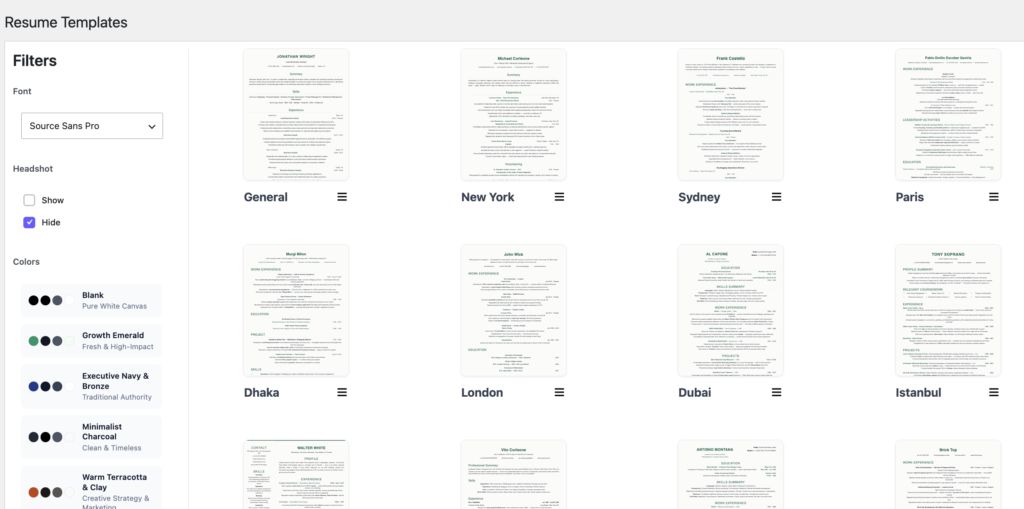
The template gallery is where every resume begins. Open Rezicraft → Templates in WordPress admin to browse, preview, and start a resume.
What is a template?
A Rezicraft template is a professional resume layout — typography, section structure, and styling — not a fixed PDF. When you click Use Template, Rezicraft creates a draft resume pre-filled with sample content you replace with your own details in the block editor.
Free template — General
The free plan includes one template:
- General — a clean, single-column layout suitable for most industries. It includes standard sections: header, summary, skills, experience, education, certificates, and optional interests.
The General template is ATS-friendly (Applicant Tracking System friendly), meaning it uses clear structure and readable formatting that works well when recruiters or systems parse your resume.
Pro templates — City layouts (15)
With Rezicraft Pro, you unlock 15 additional city-themed layouts, each with a distinct design:
| Template | Name |
|---|---|
| General | General (also on free) |
| new-york | New York |
| sydney | Sydney |
| paris | Paris |
| dhaka | Dhaka |
| london | London |
| dubai | Dubai |
| istanbul | Istanbul |
| tokyo | Tokyo |
| madrid | Madrid |
| egypt | Egypt |
| mecca | Mecca |
| nairobi | Nairobi |
| morocco | Morocco |
| bangkok | Bangkok |
| beijing | Beijing |
Pro total: 16 templates (General + 15 city layouts).
Each city template rearranges sections, typography, and visual accents while keeping content editable in Gutenberg.
Template gallery actions
On each template card you can:
- Preview — open a full-size preview with your current filter selections
- Use Template — create a new draft resume from that layout
- Edit — reopen your most recent resume for that template (from the card menu)
Important: Use Template always creates a new draft. Use this when you want a separate resume (different job, language, or version). Edit reopens an existing resume for the same template slug.
Filters sidebar (Pro)
When Pro is active, the Templates page shows a Filters sidebar on the left. Changes apply live to template thumbnails and previews:
Colors
Choose from 10 professional color palettes:
- Blank (free) — pure white canvas, no color tint
- Growth Emerald — growth marketers, startups, consultants
- Executive Navy & Bronze — senior leadership, executives
- Minimalist Charcoal — designers, writers, creatives
- Warm Terracotta & Clay — brand, content, creative strategy
- Deep Pine & Warm Paper — consulting, research, analytics
- Steel Blue & Ice Gray — engineering, operations, data
- Deep Burgundy & Charcoal — legal, finance, executive advisory
- Warm Amber & Espresso — HR, operations, customer success
- Midnight Indigo & Crisp Teal — fintech, SaaS, product, analytics
Your selection is saved to your user profile and applied when you click Use Template.
Headshot (Pro)
- Show — includes a professional photo area in the layout
- Hide — removes the headshot from the design
Upload your actual photo in the block editor after creating the resume. Recommended size: 400×400 pixels, square.
Fonts (Pro)
Choose from 14 typefaces: Calibri, Georgia, Tahoma, Verdana, Source Sans Pro, Palatino Linotype, Helvetica, Roboto, Times New Roman, Garamond, Open Sans, Cambria, Avenir, Lucida Sans.
Roboto, Open Sans, and Source Sans Pro load from Google Fonts when selected.
Tips for choosing a template
- Corporate / finance / legal — Executive Navy & Bronze, Deep Burgundy & Charcoal, London, New York
- Creative / marketing — Minimalist Charcoal, Warm Terracotta & Clay, Paris, Madrid
- Tech / product / SaaS — Midnight Indigo & Crisp Teal, Steel Blue & Ice Gray, Tokyo, Sydney
- General purpose / free plan — General with Blank palette
Preview on mobile before publishing by opening your public URL on a phone.